Departments
You may mirror your company's structure and hierarchy using departments and roles within freispace.
Departments and roles may have approval workflows for time tracking attached to them. E.g. the post department could have a different approval process than production.
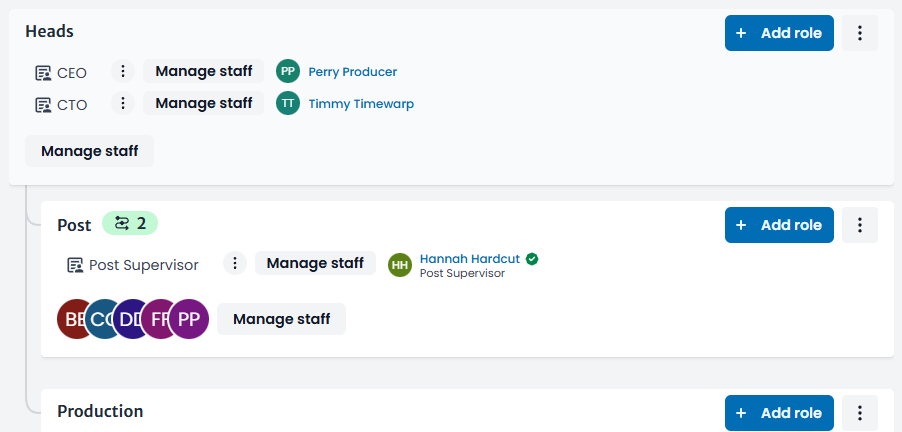
Set up departments
To set up departments:
- Navigate to Staff > Departments
- Click Add department on the top right
- Name the department
- You may make the new department a child / sub-department of another department
- Setting a department as Default will assign any new staff with enabled time tracking a member of that department (if the staff does not have any assigned departments yet)
The hierarchy view will automatically be created as you create sub-departments.
Defining roles
On any department:
- Click Add role
- Name the new role
Role name may repeat within various departments, but not within a single department. E.g. you may set up a Manager role within each department, but a single department may only have one role with that name.
Multiple staff members can be assigned to each role.
Assigning staff to departments and roles
To assign staff members to any department or role, click the appropriate Manage staff button to select and deselect assigned members.
Staff may be members of multiple roles and department.
It is not possible for a staff to be assigned to both a department's role AND the same department. Trying to do so will unassign the staff member from either role or department.
Notice: Staff and User Accounts
Staff may not always be linked to a user account. With no user account, these staff members can not receive notifications nor start or reply to approval requests. Staff that are referenced in departments and roles but have no associated account are highlighted with a yellow exclamation sign.

Shown information / tags
Departments may show a number of different tags.

-
Defaulthighlights the default department that new staff members are automatically added to. There can only be one default department. -
The
green tag with numberindicates the number of configured approval workflows that are set up for a department or role. Hovering it shows more information. -
A
yellow play taginforms you that the department has workflows that are currently in process (still requiring approval before completing). Changing workflow settings will only affect newly launched requests.